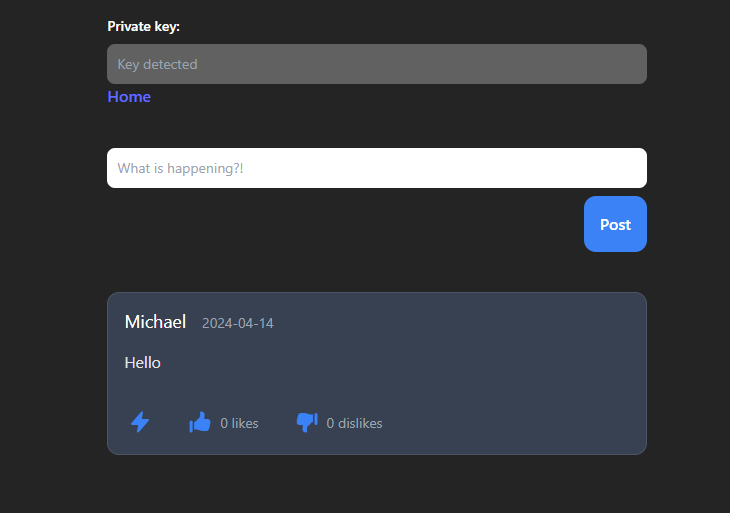
NIP-25 of the Nostr Protocol provides the ability to “react” to events. The specification is quite flexible, so as a user, we can react to any event any number of times. Once again, it is the responsibility of the client on how it wants to implement this functionality as a feature. In this post, we will implement NIP-25 with a simple example where we are able to like or dislike a post on a twitter-like Nostr client.

A reaction is a kind 7 event that can reference any other event. The following is a simple example event (pre-signed):
{
  kind: 7,
  created_at: 1723861300,
  content: '+',
  tags: [
    ['e', 'XXX'],
    ['p', 'YYY']
  ]
}- content: This is string which is essentially the reaction type, in this case “+” should be interpreted as a “like” or “upvote”, while “-” should be interpreted as a “dislike” or downvote”. The content may also be an emoji, or even a custom emoji as implemented in NIP-30.
- tags: The reaction event requires both an ‘e’ tag which indicates the id (post id) being reacted to, and a ‘p’ tag that is the public key of the event being reacted to.
Implementation
First, lets define the logic that we want to implement on the client side for reacting to a post:
- A user can either “like” or “dislike” posts made by other users (or even their own posts)
- A user can only like or dislike a post once
- A user can both like and dislike the same post
- We would like to keep track of a count of likes and dislikes
Write a helper function that sends a reaction event to our relay(s):
export async function reactToPost(user: User, id: string, pool: SimplePool | null, nostrExists: boolean, reaction: string, publicKey: string | null): Promise<Reaction | null> {
  if (nostrExists) {
    const event = {
      kind: 7,
      created_at: Math.floor(Date.now() / 1000),
      content: reaction,
      tags: [
        ['e', id],
        ['p', user.pubkey],
      ],
    };
    try {
      const signedEvent = await window.nostr.signEvent(event);
      await pool?.publish(RELAYS, signedEvent);
      return {
        liker_pubkey: publicKey ?? "",
        type: reaction,
        sig: signedEvent.sig,
      };
    } catch {
      console.log("Unable to react to post");
    }
  }
  return null;
}
Update the post retrieval process to also get all reaction events, group them by id (post id), storing the reaction type and the public key of the user who liked the post (which we can use later when we want to show a list of users who reacted):
//get likes
const postsToFetch = events
  .filter((event) => reactionsFetched.current[event.id] !== true)
  .map((event) => event.id);
if (noAuthors && postsToFetch.length === 0) {
  setLoading(false);
  return;
}
postsToFetch.forEach(
  (id) => (reactionsFetched.current[id] = true)
);

const subReactions = props.pool.subscribeMany(
  RELAYS,
  postsToFetch.map((postId) => ({
    kinds: [7],
    '#e': [postId],
  })),
  {
    onevent(event) {
      setReactions((cur) => {
        const newReaction: Reaction = {
          liker_pubkey: event.pubkey,
          type: event.content,
          sig: event.sig
        };
        const updatedReactions = { ...cur };

        const postReactions = updatedReactions[event.tags[0][1]] || [];
        const isDuplicate = postReactions.some(
          (reaction) => reaction.sig === newReaction.sig
        );

        if (!isDuplicate) {
          updatedReactions[event.tags[0][1]] = [
            ...postReactions,
            newReaction,
          ];
        }

        return updatedReactions;
      });
      setLoading(false);
    },
    oneose() {
      subReactions.close();
    }
  }
);
Finally, update the presentation to show like and dislike buttons, along with counts:
const [localReactions, setLocalReactions] = useState<Reaction[]>(reactions || []);
...
useEffect(() => {
  setLocalReactions(reactions || []);
}, [reactions]);

useEffect(() => {
  if (publicKey && localReactions) {
    setAlreadyLiked(localReactions.some((r) => r.liker_pubkey === publicKey && r.type === "+"));
    setAlreadyDisliked(localReactions.some((r) => r.liker_pubkey === publicKey && r.type === "-"));
  } else if (!user.pubkey) {
    setAlreadyLiked(true);
    setAlreadyDisliked(true);
  }
}, [publicKey, localReactions, user.pubkey]);

const handleReaction = (type: string) => {
  reactToPost(user, id, pool, nostrExists, type, publicKey).then((newReaction) => {
    if (newReaction) {
      setLocalReactions((prevReactions) => [...prevReactions, newReaction]);
    }
  });
};
<div className="p-4 pl-32">
<HandThumbUpIcon
className={!alreadyLiked ? "h-6 w-6 text-blue-500 cursor-pointer" : "h-6 w-6 text-grey-500 cursor-not-allowed"}
title={!alreadyLiked ? "Like this post" : "You have already liked this post"}
onClick={!alreadyLiked ? () => handleReaction("+") : undefined}
/>
</div>
<div className="p-4">
<span className="text-body5 text-gray-400">
{localReactions.filter((r) => r.type === "+").length} like{localReactions.filter((r) => r.type === "+").length !== 1 ? "s" : ""}
</span>
</div>
<div className="p-4 pl-32">
<HandThumbDownIcon
className={!alreadyDisliked ? "h-6 w-6 text-blue-500 cursor-pointer" : "h-6 w-6 text-grey-500 cursor-not-allowed"}
title={!alreadyDisliked ? "Dislike this post" : "You have already disliked this post"}
onClick={!alreadyDisliked ? () => handleReaction("-") : undefined}
/>
</div>
<div className="p-4">
<span className="text-body5 text-gray-400">
{localReactions.filter((r) => r.type === "-").length} dislike{localReactions.filter((r) => r.type === "-").length !== 1 ? "s" : ""}
</span>
</div>We have now implemented likes and dislikes for posts. Super easy!
Future Work
- Different reaction types — emojis (eg. laugh react) or custom emojis
- Showing a list of users that reacted and their reaction type
– Name, profile picture, etc. - Implement different logic or restrictions, for instance a user only being able to react once to a post (eg. cannot both like and dislike the same post)
Further Reading
- Part 1: A Gentle Introduction to Nostr
- Part 2: One Object To Rule Them All!
- Part 3: Setting Up A Relay
- Part 4: My First Client
- Part 5: Zapped By Lightning!
- NIP-25
Like this post and want to support the series? Tip me some sats on lightning at mikkthemagnificent@getalby.com:

 Michael Stewart
One response to “Nostr Series — Part 6: Reactions”
[…] Part 6: Reactions […]
LikeLike