In 2023, Cory Doctorow coined the perfect term for the rot that inevitably consumes digital platforms: “enshittification”. Named the Macquarie Dictionary’s Word of the Year in 2024, it describes the process by which a service begins by delighting its users and ultimately ends up exploiting them. Simply put:
“Here is how platforms die: First, they are good to their users; then they abuse their users to make things better for their business customers; finally, they abuse those business customers to claw back all the value for themselves. Then, they die.”
This dynamic has hollowed out every corner of the internet. Today, nowhere is as visible as in the usage and deployment of Large Language Models, and in particular chatbots.
The Chatbotification of Everything
Nobody asked for this, but somehow everything has become a chatbot.
Go to your bank’s website, and instead of a phone number or support form, you get an unhelpful, eyesore “AI Assistant” shoved in your face. Open up a retailer’s help page, and even before you can explain your problem, a chatbot obnoxiously interrupts with cheerful uselessness. Airlines, government portals and healthcare apps are all now gatekept by chatbots pretending to care and help.
We should first understand why this is happening, and it’s not difficult to figure out, because this pervades and ruins everything in our modern world. It’s happening because it’s profitable.
Chatbots don’t unionize, take breaks or complain about harassment. They scale infinitely at negligible marginal cost. For the executive class, replacing human labor with automated pseudo-labor has no moral considerations; it’s a virtue signal to investors.
The cruelest irony is that companies that claim to put their customers first, ensure that their customers are the ones that suffer for this change in strategy. What used to be free and included into the product; the ability to talk to a person, becomes a premium feature. This is the purest form of enshittification.
What is Progress?
We are told by AI companies that generative AI represents “the next stage of human progress”. Every press release, every investor call, every keynote is framed as history in motion, complete with recycled imagery from past revolutions — the printing press, the steam engine, the PC — all invoked without any nuance or context.
As language models first appeared, they were celebrated as knowledge engines; tools that expand our understanding, to make information and expertise more accessible. They could democratize knowledge and dissolve technical barriers.
Then came monetization. “AI-first”.
Progress was suddenly redefined, not as human flourishing but as corporate efficiency. The same executives who once promised to empower creators began boasting that their new AI assistants could replace hundreds of workers.
Is this what progress or innovation looks like? When a customer can no longer reach a human being, when a teacher is replaced by a chatbot lesson that’s slightly wrong but cheaper, when a creative tool becomes a trap for engagement — what are we doing here?
Or, is it simply austerity disguised as progress?
This form of AI isn’t expanding the human project, it’s compressing it. It squeezes labor, language and experience into cheaper, more “scalable” forms. It flattens creativity into content, reducing imagination to something that can be prompted and infinitely generated and monetized on demand.
“Progress” has become a moral shield for corporate downsizing. This is the same old story, the same extraction, enclosure and reduction of human complexity to economic simplicity.
If the direction of technological evolution is defined by shareholder value, what we’re building isn’t the future, it’s a machine for converting meaning into money.
Economics of a Chatbot Bubble
Molly White, who has been brilliantly chronicling tech’s speculative psychosis, calls this a “bubble of belief”. Just like crypto, investors are passing the same money between the same hands, inflating valuations without delivering real value.
As White has written, the AI economy is fueled by a feedback loop of hype, capital and corporate signaling. Each new “breakthrough” fuels the story that everyone else must keep up. VCs pour money into AI startups that are wrappers around the same models. Those startups pay the cloud giants for compute power, inflating those giants’ revenue and feeding their own investor story that “AI is the future”.
The money moves in a circle and the circle is disguised as a revolution. An ouroboros of capital, feeding endlessly on its own narrative, mistaking self-consumption for progress.
AI has become a form of corporate theater, a performance of futurism meant to reassure markets of the illusion of inevitability. It isn’t “the future” because we’ve chosen it; it’s “the future” because markets have decided there can be no alternative.
The AI economy isn’t building the future, it’s financializing it. Under a speculative layer of cloud contracts and VC hype lies a replacement economy — one that trades people for mediocre software and then charges you to get the people back.
The pivot is capitulation born of economic desperation. While the productivity revolution has yet to properly arrive, enterprise adoption stalls and the lofty promises fail to materialize, AI companies are left hemorrhaging cash with no path to profitability in sight. Users grew impatient and investors grew restless. The quarterly reports told an increasingly grim story of spectacular costs, underwhelming revenue and a widening chasm between the hype and reality of what these systems could offer. Faced with this economic collapse, the industry has actually made a calculated retreat to safer ground. It has turned to the oldest form of engagement that there is: sex and emotional dependency. Not because it is innovative, but because it’s the last business model left that might actually work.
In another timeline, this technology might have been directed towards solving some of the hard problems of civilization, but instead we are wasting our advanced technology to simulate affection and desire. Sex sells, and our lonely, atomized society is buying.
End-Stage Enshittification Has Arrived
The enshittification of chatbots has completed the cycle:
Promise: A tool for augmenting knowledge
Adoption: A feature to save labor costs
Dependence: A mandatory interface for basic services
Extraction: A paywall to reach a real human being
Now, the product no longer serves its users; it feeds on them.
Exactly as Doctorow wrote:
“Platforms turn into businesses that eat their own users”
Welcome to Chatbot End-Stage Enshittification.
How we built a fully automated system that detects errors, suggests and applies fixes, and creates pull requests with zero human intervention
👀 Vision
Imagine a world where production errors are automatically detected, analyzed, and fixed without any human intervention. Where AI agents work together to maintain your codebase 24/7, creating pull requests that are automatically reviewed and deployed. This isn’t science fiction, it’s our reality.
We’ve built a complete automated AI bug fixing pipeline that transforms how we handle production errors. From the moment an error occurs to the final deployment, the entire process is handled by AI agents working in harmony.
🏠 Architecture Overview
Our pipeline consists of several interconnected components that work together seamlessly:
Datadog error monitoring
AWS API Gateway webhook with Lambda integration
Claude Code Fix Batch Job
Custom slack bot
Cursor slack bot
Github PR with auto review using Claude Code
Automated deployments
Let’s break down each component and see how they work together.
🐶 Step 1: Error Detection with Datadog
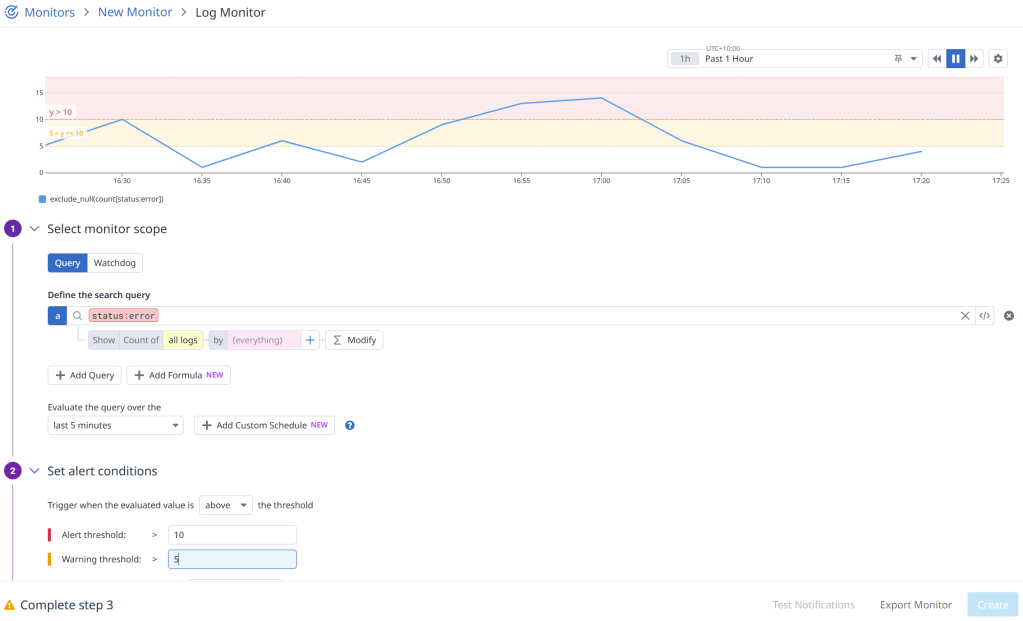
To begin, we have to configure Datadog monitors to watch for error patterns and trigger webhooks when thresholds are exceeded.
🎣 Webhook Integration
When an error threshold is exceeded, Datadog sends a webhook request to our API Gateway endpoint (using Lambda integration) with detailed error information.
Set up the webhook in Datadog by navigating to Integrations, search for “Webhook”, find “Webhooks by Datadog” and add a new webhook:
The URL here will be our API Gateway endpoint that will handle receiving and parsing the errors, then send them off to our batch job that will offer fix suggestions using Claude Code.
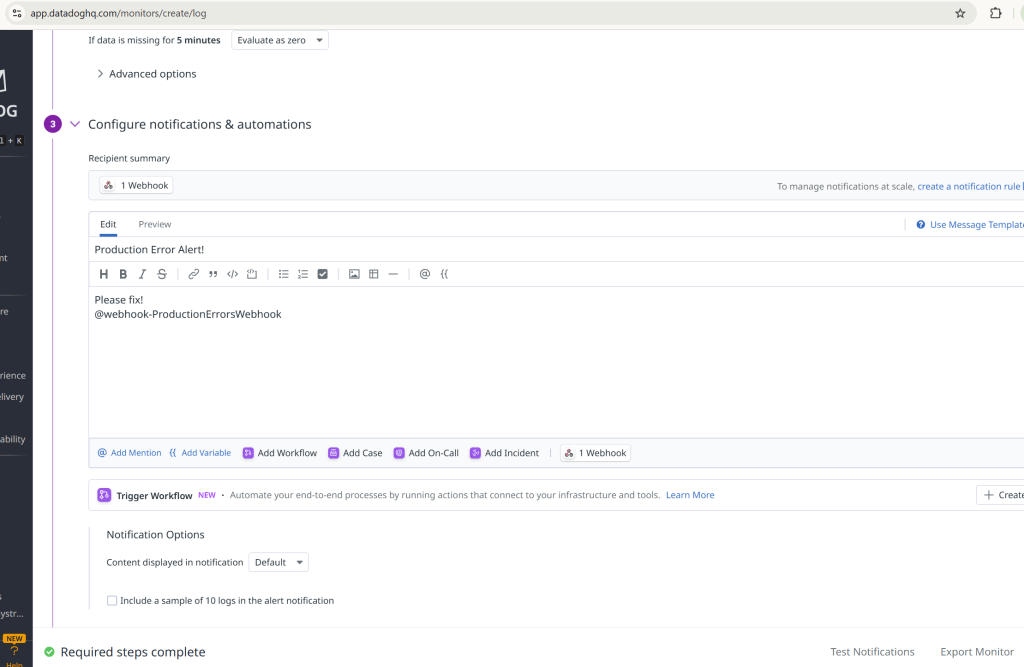
To use this webhook with our Datadog monitor, we simply add the name as a recipient to the template for the monitor we created earlier:
☁️ Step 2: Lambda Webhook Handler
Create a Lambda function to receive the webhook and process the error data. Attach the Lambda to an API Gateway so that it is accessible to Datadog:
public async Task<FunctionResponse> FunctionHandler(APIGatewayProxyRequest request, ILambdaContext context)
{
    var requestId = Guid.NewGuid().ToString("N")[..8];

    try
    {
        // Parse the webhook payload
        var webhookData = System.Text.Json.JsonSerializer.Deserialize<JsonElement>(request.Body);

        // Check if this alert should trigger a notification
        var shouldNotify = await ShouldNotifySlack(webhookData, context, requestId);

        if (shouldNotify)
        {
            // Send Slack notification and submit Claude Code Fix job
            await SendSlackNotification(webhookData, context, requestId);

            return new FunctionResponse
            {
                Success = true,
                Message = "Slack notification sent successfully"
            };
        }
    }
    catch (Exception ex)
    {
        throw;
    }
}
Error Data Retrieval from Datadog
The Lambda function doesn’t rely solely on the webhook payload. It actively fetches detailed error information from Datadog’s API to provide rich context for the AI analysis:
private async Task<List<ErrorLog>> FetchRecentErrorLogs(string query, int threshold, ILambdaContext context, string requestId)
{
    try
    {
        var datadogApiKey = Environment.GetEnvironmentVariable("DATADOG_API_KEY");
        var datadogAppKey = Environment.GetEnvironmentVariable("DATADOG_APP_KEY");
        // Calculate time range (last 1 hour)
        var endTime = DateTime.UtcNow;
        var startTime = endTime.AddHours(-1);
        // Use Datadog Logs API v2 to fetch detailed error logs
        var requestBody = new
        {
            filter = new
            {
                query = query,
                from = startTime.ToString("yyyy-MM-ddTHH:mm:ssZ"),
                to = endTime.ToString("yyyy-MM-ddTHH:mm:ssZ")
            },
            sort = "timestamp",
            page = new
            {
                limit = threshold
            }
        };
        var json = System.Text.Json.JsonSerializer.Serialize(requestBody);
        var content = new StringContent(json, Encoding.UTF8, "application/json");
        using var httpClient = new HttpClient();
        httpClient.DefaultRequestHeaders.Add("DD-API-KEY", datadogApiKey);
        httpClient.DefaultRequestHeaders.Add("DD-APPLICATION-KEY", datadogAppKey);
        var response = await httpClient.PostAsync("https://api.datadoghq.com/api/v2/logs/events/search", content);
        if (!response.IsSuccessStatusCode)
        {
            var errorContent = await response.Content.ReadAsStringAsync();
            context.Logger.LogError($"[{requestId}] Datadog API error: {response.StatusCode} - {errorContent}");
            return new List<ErrorLog>();
        }
        var responseContent = await response.Content.ReadAsStringAsync();
        var logResponse = System.Text.Json.JsonSerializer.Deserialize<JsonElement>(responseContent);
        var errorLogs = new List<ErrorLog>();
        // Parse and enrich the error logs with additional context
        if (logResponse.TryGetProperty("data", out var dataArray))
        {
            foreach (var log in dataArray.EnumerateArray())
            {
                var errorLog = new ErrorLog
                {
                    Timestamp = ParseTimestamp(log),
                    Message = ExtractMessage(log),
                    Exception = ExtractException(log),
                    Url = ExtractUrl(log),
                    UserId = ExtractUserId(log),
                    TraceId = ExtractTraceId(log)
                };
                errorLogs.Add(errorLog);
            }
        }
        return errorLogs;
    }
    catch (Exception ex)
    {
        return new List<ErrorLog>();
    }
}
This data enrichment process provides the AI with more context than what’s available in the webhook payload alone, including:
Full error stack traces with line numbers and file paths
Request context including URLs, user IDs, and trace IDs
Timing information for error frequency analysis
Environment details and service information
Custom metadata from your application logs
Error Analysis and Grouping
The Lambda function doesn’t just forward the error, it analyzes and groups similar errors to avoid spam:
For each unique error, our Lambda webhook handler will submit a batch job to our ClaudeCodeFixJob. This job clones the repository, installs Claude Code, and generates fix suggestions.
Batch Job Submission
private async Task SubmitClaudeFixJob(UniqueError uniqueError, JsonElement webhookEvent, ILambdaContext context, string requestId)
{
    var environment = Environment.GetEnvironmentVariable("ENVIRONMENT") ?? "unknown";
    var jobDefinitionName = $"{environment}-ClaudeCodeFixJob";
    var jobQueueName = $"{environment}-claude-fix-queue";

    // Create error data for the batch job
    var errorData = new
    {
        ErrorType = ExtractErrorType(uniqueError.Exception),
        ErrorMessage = uniqueError.ErrorMessage,
        Component = "API",
        Service = "MyAPI",
        Timestamp = DateTime.UtcNow.ToString("yyyy-MM-dd HH:mm:ss UTC"),
        Environment = environment,
        AdditionalData = new Dictionary<string, object>
        {
            ["occurrenceCount"] = uniqueError.OccurrenceCount,
            ["firstOccurrence"] = uniqueError.FirstOccurrence.ToString("yyyy-MM-dd HH:mm:ss UTC"),
            ["lastOccurrence"] = uniqueError.LastOccurrence.ToString("yyyy-MM-dd HH:mm:ss UTC"),
            ["sampleUrls"] = uniqueError.SampleUrls,
            ["sampleUserIds"] = uniqueError.SampleUserIds,
            ["sampleTraceIds"] = uniqueError.SampleTraceIds
        }
    };

    // Submit the batch job
    var submitJobRequest = new SubmitJobRequest
    {
        JobName = $"claude-fix-{DateTime.UtcNow:yyyyMMdd-HHmmss}-{uniqueError.ErrorMessage.GetHashCode()}",
        JobQueue = jobQueueName,
        JobDefinition = jobDefinitionName,
        ContainerOverrides = new ContainerOverrides
        {
            Environment = environmentVariables
        }
    };

    var submitJobResponse = await _batchClient.SubmitJobAsync(submitJobRequest);
}
🤖 Step 4: Slack Bot Integration
Creating the Slack Bot
First, we create a Slack app in the Slack API dashboard:
The bot needs specific permissions to send messages and interact with channels:
# Required OAuth Scopes for the bot
scopes:
  - chat:write                    # Send messages to channels
  - chat:write.public            # Send messages to public channels
  - channels:read                # Read channel information
  - users:read                   # Read user information
  - app_mentions:read            # Read mentions of the bot
⚙️ Step 5: Batch Job Setup
The batch job uses Claude Code to analyze the error and generate fix suggestions.
Repository Cloning and Setup
Before Claude Code can analyze the codebase, we need to clone the repository and set up the environment:
private string? CloneRepository()
{
    try
    {
        var repoPath = Path.Combine(_workingDirectory, "repo");

        if (Directory.Exists(repoPath))
        {
            using var repo = new Repository(repoPath);

            // Configure git credentials for private repositories
            if (!string.IsNullOrEmpty(_githubToken))
            {
                var signature = new Signature("Claude Fix Bot", "claude@company.com", DateTimeOffset.Now);
                var options = new PullOptions
                {
                    FetchOptions = new FetchOptions
                    {
                        CredentialsProvider = (_url, _user, _cred) =>
                            new UsernamePasswordCredentials
                            {
                                Username = "token",
                                Password = _githubToken
                            }
                    }
                };

                Commands.Pull(repo, signature, new PullOptions());
            }
            else
            {
                Commands.Pull(repo, new Signature("Claude Fix Bot", "claude@company.com", DateTimeOffset.Now), new PullOptions());
            }
        }
        else
        {
            var cloneOptions = new CloneOptions
            {
                BranchName = _gitBranch,
                Checkout = true
            };

            // Add credentials for private repositories
            if (!string.IsNullOrEmpty(_githubToken))
            {
                cloneOptions.CredentialsProvider = (_url, _user, _cred) =>
                    new UsernamePasswordCredentials
                    {
                        Username = "token",
                        Password = _githubToken
                    };
            }

            Repository.Clone(_gitRepoUrl, repoPath, cloneOptions);
        }

        // Verify the repository was cloned/updated correctly
        using var repo = new Repository(repoPath);
        var currentBranch = repo.Head.FriendlyName;
        var lastCommit = repo.Head.Tip;
        return repoPath;
    }
    catch (Exception ex)
    {
        return null;
    }
}
Claude Code Installation
Once the repository is cloned, we install and configure Claude Code:
private async Task<bool> InstallClaudeCodeAsync(string repoPath)
{
    try
    {
        // Check if Node.js is available
        var nodeResult = await ExecuteCommandAsync("node", "--version", repoPath);
        if (nodeResult.ExitCode != 0)
        {
            return false;
        }

        // Install Claude Code globally
        var installResult = await ExecuteCommandAsync("npm", "install -g @anthropic-ai/claude-code", repoPath);
        if (installResult.ExitCode != 0)
        {
            return false;
        }

        // Update Claude Code to latest version
        var updateResult = await ExecuteCommandAsync("claude", "update", repoPath);
        if (updateResult.ExitCode != 0)
        {
            // Continue anyway, the installed version might work
        }

        // Configure Claude Code authentication
        var anthropicApiKey = Environment.GetEnvironmentVariable("ANTHROPIC_API_KEY");
        if (!string.IsNullOrEmpty(anthropicApiKey))
        {
            // Set the API key for Claude Code
            var configResult = await ExecuteCommandAsync("claude", $"config set api_key {anthropicApiKey}", repoPath);
        }
    }
    catch (Exception ex)
    {
        return false;
    }
}
Command Execution Helper
We use a robust command execution helper for all CLI operations:
private async Task<(int ExitCode, string Output, string Error)> ExecuteCommandAsync(
    string command,
    string arguments,
    string workingDirectory,
    int timeoutSeconds = 60)
{
    try
    {

        var startInfo = new System.Diagnostics.ProcessStartInfo
        {
            FileName = command,
            Arguments = arguments,
            WorkingDirectory = workingDirectory,
            RedirectStandardOutput = true,
            RedirectStandardError = true,
            UseShellExecute = false,
            CreateNoWindow = true
        };

        using var process = new System.Diagnostics.Process { StartInfo = startInfo };
        process.Start();

        // Use a timeout to prevent hanging processes
        var outputTask = process.StandardOutput.ReadToEndAsync();
        var errorTask = process.StandardError.ReadToEndAsync();
        var exitTask = process.WaitForExitAsync();

        // Wait for all tasks with timeout
        var timeoutTask = Task.Delay(TimeSpan.FromSeconds(timeoutSeconds));
        var completedTask = await Task.WhenAny(exitTask, timeoutTask);

        if (completedTask == timeoutTask)
        {
            // Timeout occurred
            try
            {
                process.Kill();
            }
            catch { }
            return (-1, "", $"Command timed out after {timeoutSeconds} seconds");
        }

        var output = await outputTask;
        var error = await errorTask;

        return (process.ExitCode, output, error);
    }
    catch (Exception ex)
    {
        return (-1, "", ex.Message);
    }
}
Claude Code Integration
Once the repository is cloned and Claude Code is installed, we can analyze errors:
private async Task<string?> GetClaudeFixSuggestionAsync(string repoPath, ErrorFixRequest errorData)
{
    try
    {
        // Clean and prepare the error message
        var cleanErrorMessage = errorData.ErrorMessage;
        var parts = cleanErrorMessage.Split("info error:");
        if (parts.Length > 1)
        {
            cleanErrorMessage = parts[1].Trim();
        }

        // Create the prompt for Claude Code
        var simplePrompt = _claudePromptTemplate
            .Replace("{ErrorType}", errorData.ErrorType)
            .Replace("{ErrorMessage}", cleanErrorMessage)
            .Replace("{Component}", errorData.Component)
            .Replace("{Service}", errorData.Service)
            .Replace("\\n", "\n");

        // For command line safety, replace newlines with spaces
        var commandLinePrompt = simplePrompt.Replace("\n", " ");

        // Run Claude Code with the repository context
        var result = await ExecuteCommandAsync("claude", $"-p \"{commandLinePrompt}\"", repoPath, 600);

        if (result.ExitCode != 0)
        {
            return "Failed to get response from Claude Code - the tool may not be working in this environment";
        }
        // Check if we got any output
        if (string.IsNullOrEmpty(result.Output))
        {
            return "No response received from Claude Code - the command may have failed or timed out";
        }

        // Extract the response from the output
        var response = ExtractClaudeResponse(result.Output);
        return response;
    }
    catch (Exception ex)
    {
        return null;
    }
}
Send Slack Message
private async Task SendSlackMessageAsync(string message)
{
    var payload = new
    {
        channel = _slackChannel,
        text = message,
        username = "Claude Code Fix Bot",
        icon_emoji = ":robot_face:"
    };

    var json = JsonConvert.SerializeObject(payload);
    var content = new StringContent(json, Encoding.UTF8, "application/json");

    using var httpClient = new HttpClient();
    var response = await httpClient.PostAsync(_slackWebhookUrl, content);
}
Example Slack Message
The bot sends structured messages like this:
🤖 Claude Code Fix Suggestion

Error Details:
• Type: NullReferenceException
• Message: Object reference not set to an instance of an object
• Component: UserService
• Service: API

🐛 Claude's Suggested Fix:
```
// Add null check before accessing user object
if (user != null)
{
    return user.Name;
}
return "Unknown User";
```

👉 Next Steps:
Review the suggestion above and reply to this message tagging @cursor to apply the changes.
🔈 Step 6: Cursor Bot Integration
You can find the Cursor Slack bot here. Install it to your workspace and configure it.
When a team member reviews the suggestion and wants to apply the change, they simply reply to the Slack message tagging @cursor. Cursor then:
Analyzes the error and suggested fix
Creates a new branch with the changes
Commits the fix
Creates a pull request
✏️ Step 7: Automated Code Review
When a pull request is created, our GitHub Action automatically triggers a code review using Claude:
name: Claude Code Review

on:
  pull_request:
    types: [opened]

jobs:
  claude-review:
    runs-on: ubuntu-latest
    permissions:
      contents: read
      pull-requests: write
      issues: write
      id-token: write

    steps:
      - name: Checkout repository
        uses: actions/checkout@v4
        with:
          fetch-depth: 1

      - name: Notify Slack - Review Started
        uses: 8398a7/action-slack@v3
        with:
          status: custom
          custom_payload: |
            {
              "attachments": [{
                "color": "#FFA500",
                "text": "🤖 Claude is *STARTING* code review for ${{ github.repository }}\n• *PR:* #${{ github.event.pull_request.number }} - ${{ github.event.pull_request.title }}\n• *Author:* ${{ github.event.pull_request.user.login }}"
              }]
            }
        env:
          SLACK_WEBHOOK_URL: ${{ secrets.SLACK_WEBHOOK_URL }}

      - name: Run Claude Code Review
        uses: anthropics/claude-code-action@beta
        with:
          anthropic_api_key: ${{ secrets.ANTHROPIC_API_KEY }}
          github_token: ${{ github.token }}
          direct_prompt: |
            Please review this pull request and provide feedback on:
            - Code quality and best practices
            - Potential bugs or issues
            - Performance considerations
            - Security concerns
            - Test coverage

            Be constructive and helpful in your feedback.
🚀 Step 8: Auto-Deployment
Once the pull request is approved and merged, our existing CI/CD pipeline automatically deploys the changes to our desired environment.
➕Results and Benefits
Before the Pipeline:
Error Detection: Manual monitoring required
Error Analysis: Developers had to investigate each error
Fix Creation: Manual code changes and testing
Deployment: Manual review and deployment process
Time to Resolution: Hours to days
After the Pipeline:
Error Detection: Automatic via Datadog
Error Analysis: AI-powered analysis with Claude Code
Fix Creation: Automated suggestions and code changes
Deployment: Fully automated with AI review
Time to Resolution: Minutes to hours
Example Result
This output was based on a dummy API endpoint that logs errors in order to test the pipeline. It correctly detected that the endpoint was a dummy and suggested to remove it, which was then applied to the codebase with a PR from Cursor. This PR was then automatically reviewed by Claude Code, checked by a human and automatically deployed. The only human intervention was to apply the suggestion and look at PR and associated AI code review!
👉 What’s Next?
Multi-Language Support: Extend to Python, Javascript, Go
Advanced Error Classification: Use Machine Learning to categorize errors more accurately
Rollback Automation: Automatic rollback if fixes cause new errors
Performance Monitoring: Track fix effectiveness and performance impact
Team Notifications: Escalate to human developers for complex issues
JIRA Integration: Handle human and user submitted errors
Technical Debt Detection: Scheduled job to detect technical debt and offer suggestions to address
The future of DevOps is AI-automated, and it’s already here
“As I emerged from prison, I see that Artificial Intelligence is being used to create mass assassinations. Where before there was a difference between assassination and warfare, now the two are conjoined, where many, perhaps the majority of targets in Gaza are bombed as a result of Artificial Intelligence targeting. The connection between Artificial Intelligence and surveillance is important. Artificial Intelligence needs information to come up with targets, or ideas, or propaganda. When we’re talking about the use of Artificial Intelligence to conduct mass assassinations, surveillance data from telephones and internet is key to training those algorithms” — Julian Assange
After decades of development, multiple hype cycles, and several “AI Winters,” Artificial Intelligence is at a critical juncture. According to the prevailing narratives, there are two divergent paths for AI: one leading to dystopia, the other to utopia.
On the one hand, AI promises to deliver unlimited productivity improvements, freeing human labor from tedious tasks and enabling more creative, fulfilling pursuits. AI could potentially solve humanity’s most complex challenges, uncovering groundbreaking solutions hidden in massive datasets.
On the other hand, AI facilitates the mass production of content at negligible cost, creating fertile ground for misinformation and propaganda. Additionally, it amplifies the power of mass surveillance, following the trajectory of earlier technologies like telecommunications and the Internet.
Tracked and Traced
The practice of surveillance, or systematic observation has a long history, intertwined with power. From ancient emperors deploying spies to monitor dissent, to medieval rulers using informants to control their courts, surveillance has long existed as a tool for maintaining authority. Modern advancements in technology has transformed this localized practice into a global infrastructure that systematically strips individuals of their right to privacy.
In the 20th century, during the rise of nation states and world wars, governments established intelligence networks such as Britain’s MI5 and the United States’ Office of Naval Intelligence (ONI). Wiretapping became a key surveillance method, often conducted without warrants or consent. This invasive practice was justified in the name of the “greater good,” such as catching criminals or safeguarding national security.
During the Cold War era, state surveillance expanded dramatically. The U.S. National Security Agency (NSA) grew in scope, with its activities justified by the fight against Communism (The Red Scare). Programs like COINTELPRO (Counter Intelligence Program) targeted civil rights activists, anti-war protesters, and even cultural figures like Martin Luther King Jr. In the 1970s, the Church Committee — a U.S. Senate investigation — exposed decades of unconstitutional surveillance practices, revealing a troubling history of government overreach against its own citizens.
So Many Eyes
The late 20th century ushered in advancements like cell phones and the Internet, providing even more opportunities for surveillance. Intelligence agencies began tapping not just phone calls but also text messages, emails, and other online activities — often without cause and without users’ knowledge.
The September 11 terrorist attacks marked a paradigm shift. In response, the PATRIOT Act authorized unprecedented surveillance powers, transforming targeted observation into mass surveillance. Until whistleblower Edward Snowden’s revelations in 2013, most Americans were unaware of the scale of this intrusion into their privacy.
Big Tech Wants A Piece
In more recent years, big tech companies have become embedded into the machinations of mass surveillance, blurring the lines between private enterprise and state power. One of the largest technology companies, Microsoft, has played a significant role in this evolution, entering into contracts with government that would provide the technological tools to carry out these surveillance programs.
These tools include Microsoft’s Azure cloud platform and AI technologies such as facial recognition and data analytics. Microsoft’s involvement extends beyond the U.S., with partnerships worldwide, including with governments accused of human rights abuses. While Microsoft publicly claims to align with human rights principles, its actions suggest otherwise, underscoring the need for regulation and reform.
Shadows In The Walls: Convenience at a Cost
Amazon’s Alexa device highlights the significant trade-offs individuals are willing to make between privacy and convenience. Users effectively invite a form of constant surveillance, or wiretapping, into what has traditionally been regarded as a sanctuary of privacy. This compromises a principle deeply rooted in human rights, including protections enshrined in the U.S. Constitution and Bill of Rights, which uphold the home as a place shielded from intrusion. Amazon has faced scrutiny on how it collects, stores and uses data from Alexa and other devices. Many users are unaware of how much information is being gathered or how to delete recordings permanently. Alexa and similar devices contribute to what privacy advocates call the “normalization of surveillance.” By embedding microphones, cameras, and AI assistants into daily life, companies like Amazon make constant data collection seem routine and unremarkable.
AI Ramps It Up
Recently, OpenAI announced new product enhancements, including “advanced voice mode” and features involving cellphone camera integration. Simultaneously, both OpenAI and Anthropic secured deals with the U.S. government to research and test their AI models. Notably, OpenAI appointed ex-NSA director Paul M. Nakasone to its board of directors in April 2024.
In November 2024, Anthropic partnered with Palantir — a company synonymous with mass surveillance — and Amazon AWS to use its Claude language model for processing classified government data. These developments starkly contrast Anthropic’s public messaging about AI safety and existential risk, raising serious concerns about corporate-government alliances and their implications for privacy.
A Fork In The Road
The marriage of Artificial Intelligence with mass surveillance presents a stark crossroads for humanity. AI’s power to analyze and act on vast datasets is unparalleled, but its use in targeting, propaganda, and pervasive surveillance raises critical ethical questions. The technologies once hailed as tools for liberation are increasingly turned into instruments of control, blurring the lines between convenience, safety, and oppression.
As citizens, we must resist the normalization of surveillance and demand transparency, accountability, and regulation of both governments and corporations wielding these tools. The path AI takes — utopian or dystopian — will depend on the values we embed in its design, deployment, and governance. Without concerted effort, we risk surrendering not just our privacy, but our agency, to systems that view humanity as data points rather than individuals.
History reminds us that unchecked power leads to abuse. The revelations of COINTELPRO, the PATRIOT Act, and the Snowden leaks were not aberrations but predictable outcomes of systems built without oversight. Today, the stakes are even higher. The question we face is not just whether AI will be used for good or ill, but whether we as a society will demand that it serves humanity’s collective interests rather than undermining them.





 Michael Stewart